
React Server Components: what actually changes
Since the Next.js App Router shipped, React Server Components (RSC) have become the default model. Many teams use them without really knowing what happens under the hood, and end up adding "use client" everywhere "to make it work". The result: most of the benefits are lost.
In this article we break the model down: what a Server Component is, where the client boundary sits, and the simple rules that let you take advantage of it.
The problem RSC solves
In a classic React application (SPA or "old-school" SSR), all component code is shipped to the browser, even code that only displays static data. A product page that formats markdown or dates ships the markdown and date libraries in the JavaScript bundle, even though the user never interacts with them.
Then there is data fetching. The page renders, a useEffect fires an API call, then a child component fires another one… the infamous request waterfall.
Server Component vs Client Component
A Server Component runs only on the server (at build time or request time). Its code is never sent to the browser, only its rendered output. It can be async, read a database, access secrets and import large libraries with zero impact on the bundle.
A Client Component is a "classic" React component: it is rendered on the server for the initial HTML, then hydrated in the browser. It is the only place where you can use useState, useEffect, event handlers or browser APIs.
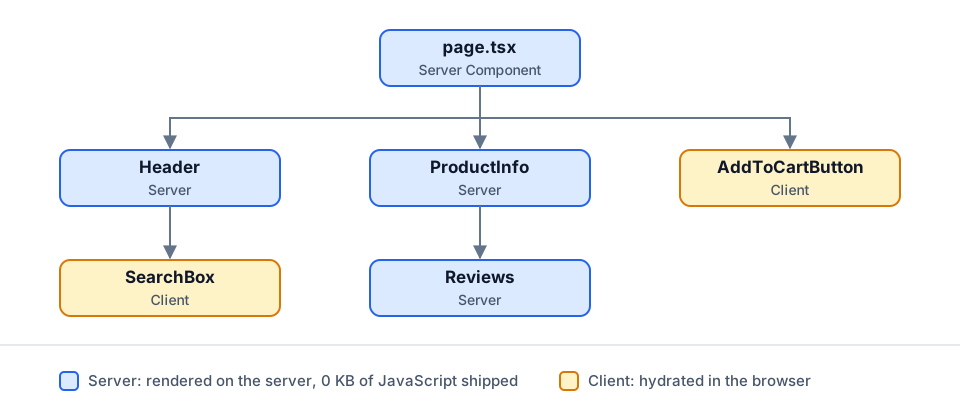
"use client" is a boundary, not a label
This is the most misunderstood part. "use client" does not just mark one component: it marks an entry point. Everything that file imports becomes client code too. Putting the directive at the top of the tree turns the whole application into Client Components.
The right approach is to push the boundary as far down as possible, towards the leaves of the tree: an "Add to cart" button, a dropdown menu, a form.
// app/products/[id]/page.tsx — Server Component (default)
import { db } from "@/lib/db";
import { AddToCartButton } from "./add-to-cart-button";

export default async function ProductPage({ params }: { params: Promise<{ id: string }> }) {
  const { id } = await params;
  const product = await db.product.findUnique({ where: { id } });

  return (
    <article>
      <h1>{product.name}</h1>
      <p>{product.description}</p>
      {/* Only this button is shipped to the browser */}
      <AddToCartButton productId={product.id} />
    </article>
  );
}
// app/products/[id]/add-to-cart-button.tsx
"use client";
import { useState } from "react";
export function AddToCartButton({ productId }: { productId: string }) {
const [added, setAdded] = useState(false);
return (
<button onClick={() => setAdded(true)}>
{added ? "Added ✓" : "Add to cart"}
</button>
);
}The rules to remember
- A Server Component can import a Client Component; the reverse is not directly possible.
- A Client Component can receive a Server Component through `children` (or any ReactNode prop). This is the pattern for keeping an interactive shell (a drawer, tabs) around server-rendered content.
- Props crossing the boundary must be serializable: strings, numbers, plain objects, arrays, dates… but no functions or class instances.
- Data is fetched directly in the component, with
await, as close as possible to where it is used. Next.js deduplicates identical requests within a single render.
Common pitfalls
- Importing a server module in a Client Component (database client, secret environment variables). The
server-onlypackage makes the build fail if that happens. - Using React Context for everything: a Provider is necessarily a Client Component. Isolate it in a small file and use it as a wrapper with
children. - Creating server-side waterfalls: two independent
awaits run one after the other. UsePromise.allwhen requests do not depend on each other.
Conclusion
Server Components are not just an optimization: they change how work is split between server and browser. By keeping interactivity in small client "islands" and everything else on the server, you get lighter bundles, simpler data fetching and faster pages. The golden rule: server by default, client only when needed.