React 19: Actions, useOptimistic, use() and the end of forwardRef
React 19 went stable on December 5, 2024. Unlike some major versions focused on internals, this one changes how we write everyday code, especially forms and data mutations. Here is a tour of the features that matter.
Actions: goodbye to the isLoading / error / data trio
For years, every form repeated the same code: a loading state, an error state, a try/catch, a preventDefault. React 19 introduces Actions: (possibly async) functions run inside a transition, for which React automatically handles the pending state, errors and form reset.
useActionState: a form in a few lines
"use client";
import { useActionState } from "react";
import { updateName } from "./actions";

export function NameForm() {
  const [error, submitAction, isPending] = useActionState(
    async (_previous: string | null, formData: FormData) => {
      const result = await updateName(formData.get("name") as string);
      return result.error ?? null;
    },
    null
  );

  return (
    <form action={submitAction}>
      <input name="name" required />
      <button disabled={isPending}>{isPending ? "Saving…" : "Save"}</button>
      {error && <p role="alert">{error}</p>}
    </form>
  );
}
No more useState for loading, no more onSubmit: a function is passed straight to the form's action attribute. The form resets automatically on success.
For a button nested in a design system, useFormStatus (imported from react-dom) exposes the parent form's pending state without prop drilling.
useOptimistic: an instant UI
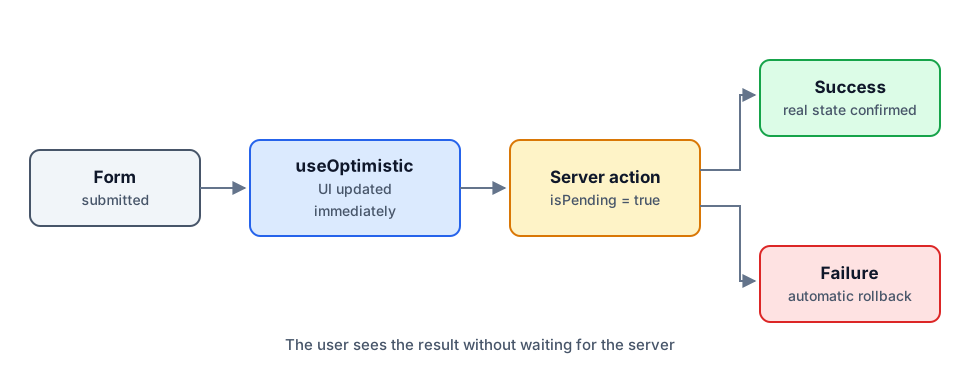
When a user adds a comment or checks a task, waiting for the server feels slow. useOptimistic shows the expected result immediately, then automatically reverts to the real state if the action fails.
const [optimisticTodos, addOptimisticTodo] = useOptimistic(
  todos,
  (current, newTodo: Todo) => [...current, { ...newTodo, pending: true }]
);

async function addTodo(formData: FormData) {
  const todo = { id: crypto.randomUUID(), title: formData.get("title") as string };
  addOptimisticTodo(todo);   // shown immediately
  await createTodo(todo);    // server confirmation
}
use(): read a promise or a context
The new use API reads the value of a promise (suspending rendering until it resolves, with a parent Suspense) or a context. Unlike hooks, use can be called inside a condition.
function Comments({ commentsPromise }: { commentsPromise: Promise<Comment[]> }) {
  const comments = use(commentsPromise);
  return comments.map((c) => <p key={c.id}>{c.text}</p>);
}
Careful: the promise must be created outside the component (for example in a Server Component that passes it down), otherwise a new promise is created on every render.
Small features that make life easier
- `ref` is now a regular prop for function components: no more
forwardRef, which will eventually be deprecated. - `<Context>` can be used directly as a provider instead of
<Context.Provider>. - `<title>`, `<meta>` and `<link>` tags rendered anywhere in the tree are automatically hoisted into the
<head>. - Ref cleanup functions: a ref callback can return a function called on unmount.
- Better hydration error messages, with a diff between server and client output.
Migrating with confidence
Migrating from React 18 is usually straightforward. The React team recommends going through React 18.3 first, which warns about removed APIs (propTypes and defaultProps on function components, legacy context, string refs…). Codemods automate most of the changes.
Conclusion
React 19 finally makes native the patterns every team used to rewrite by hand: form handling, optimistic updates, data loading with Suspense. Combined with Next.js Server Actions, it lets you write complete mutations, from the button to the database, with very little code.