End-to-end testing with Playwright: a strategy that lasts
End-to-end tests have a bad reputation: slow, flaky, broken by every UI change. Yet they are the only ones that check what really matters: that a user can sign up, buy, book. With Playwright and a few rules, you get a reliable suite that reassures instead of slowing you down.
What should be tested end to end?
E2E tests are the most expensive to write and run. They form the top of the testing pyramid: few in number, they cover critical journeys, while detailed logic is tested lower down with unit and integration tests.
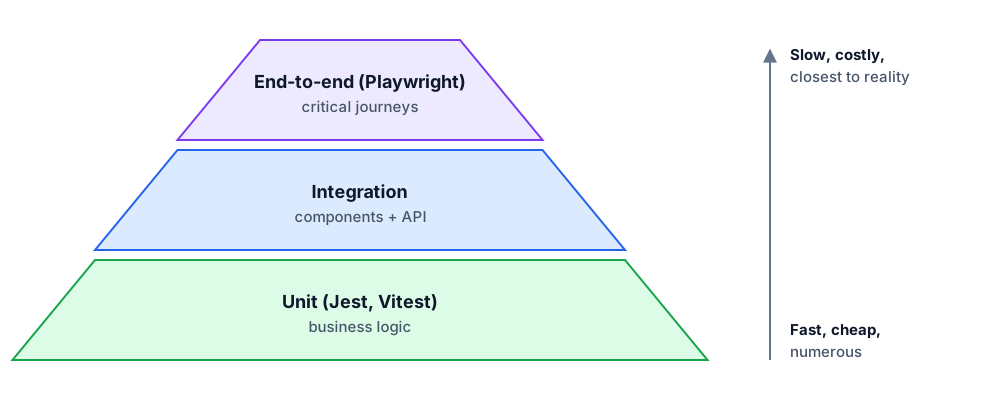
A good question to decide: "If this journey breaks in production, do we lose money or users?" Sign-up, login, payment, booking, contact form: yes. The color of a button: no.
Locators that do not break
The number one cause of flakiness is fragile CSS selectors (.btn-primary > span:nth-child(2)). Playwright encourages user-facing locators, which target elements the way a human (or a screen reader) perceives them.
import { test, expect } from "@playwright/test";

test("a visitor can book a session", async ({ page }) => {
  await page.goto("/book");

  await page.getByRole("button", { name: "Pick a slot" }).click();
  await page.getByRole("option", { name: /10:00/ }).click();
  await page.getByLabel("Email address").fill("test@example.com");
  await page.getByRole("button", { name: "Confirm" }).click();

  await expect(page.getByRole("heading", { name: "Booking confirmed" })).toBeVisible();
});
Bonus: if getByRole or getByLabel cannot find an element, it often signals an accessibility problem. The tests improve the application along the way.
Never wait "blindly"
- No `waitForTimeout(2000)`: it is slow when things go well and not enough when the server is under load.
- Actions auto-wait for the element to be visible, stable and enabled.
- Web-first assertions (
await expect(locator).toBeVisible(),toHaveText,toHaveURL) retry until the condition is met or the timeout expires.
Authenticate once
Logging in through the UI in every test wastes minutes. Playwright lets you log in once in a setup project, save the state (cookies, local storage) and reuse it across all tests.
// playwright.config.ts
export default defineConfig({
  projects: [
    { name: "setup", testMatch: /auth\.setup\.ts/ },
    {
      name: "chromium",
      use: { ...devices["Desktop Chrome"], storageState: "playwright/.auth/user.json" },
      dependencies: ["setup"],
    },
  ],
  use: { trace: "on-first-retry" },
  retries: process.env.CI ? 2 : 0,
});
Controlled test data
- Each test creates its own data (through the API or the database) instead of relying on a shared dataset that other tests modify.
- Unique identifiers (
test-${Date.now()}@example.com) make parallel runs possible. - External services (payment, email) are mocked with
page.route()or replaced by their sandbox environments.
Debug with traces
With trace: "on-first-retry", Playwright records a full trace when a test fails and is retried: every action, DOM snapshots before and after, network requests and console. npx playwright show-trace replays the failure step by step. It is the tool that makes the biggest difference when a test only fails in CI.
In CI
- Test the production build, with
webServerin the config to start the application automatically. - Split tests across machines with
--shard=1/4. - Track flaky tests: a test that only passes on the second attempt must be fixed, not ignored.
Conclusion
A useful E2E suite is short, focused on the journeys that matter, written with accessible locators, free of arbitrary waits, with isolated data and traces for debugging. With these rules, Playwright tests become the safety net that lets you ship with confidence.