Multi-tenant Next.js: serving 1,000 sites from a single app
Picture a platform that must give each of its customers (brokers, agencies, franchisees) their own website, with their own domain, logo, colors and content. Deploying one application per customer quickly becomes unmanageable: a thousand customers, a thousand deployments, a thousand updates.
The solution I built on a platform project for brokers: a single multi-tenant Next.js application that renders the right site based on the domain name. It enabled the automated rollout of more than 1,000 websites. Let's break down the architecture.
The principle
A "tenant" is a customer of the platform. Every request hits the same application; the domain name (the Host header) decides which tenant to render.
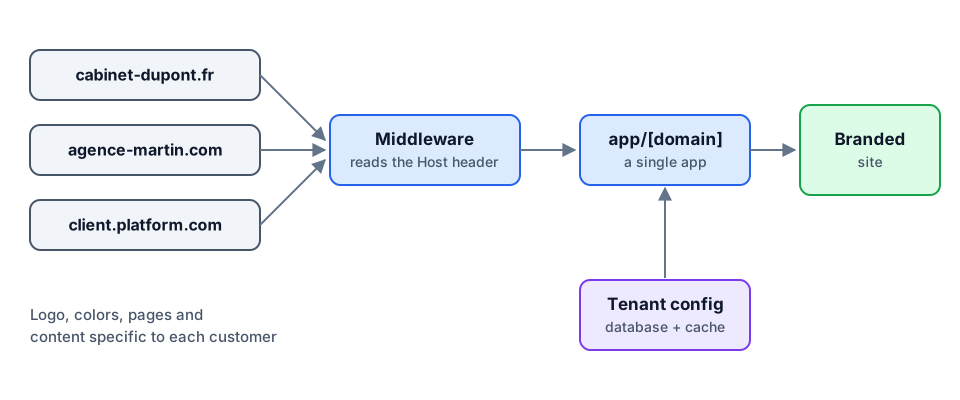
Step 1: the middleware rewrites the URL
Middleware runs before every request. It reads the domain and rewrites (not redirects) the URL to an internal route that includes the domain as a parameter. The user still sees www.dupont-brokers.com/contact, but Next.js serves /dupont-brokers.com/contact.
// middleware.ts
import { NextResponse, type NextRequest } from "next/server";

export const config = {
  // Skip assets and API routes
  matcher: ["/((?!api|_next|.*\\..*).*)"],
};

export function middleware(req: NextRequest) {
  const host = req.headers.get("host")!.replace(/^www\./, "").toLowerCase();
  const url = req.nextUrl.clone();
  url.pathname = `/${host}${url.pathname}`;
  return NextResponse.rewrite(url);
}
Step 2: one dynamic route per domain
Every page lives under a dynamic app/[domain]/ segment. Each page starts by loading the tenant configuration.
// app/[domain]/page.tsx
import { notFound } from "next/navigation";
import { getTenant } from "@/lib/tenants";

export default async function Home({ params }: { params: Promise<{ domain: string }> }) {
  const { domain } = await params;
  const tenant = await getTenant(domain);
  if (!tenant) notFound();

  return (
    <main style={{ "--brand": tenant.primaryColor } as React.CSSProperties}>
      <img src={tenant.logoUrl} alt={tenant.name} />
      <h1>{tenant.headline}</h1>
    </main>
  );
}
Step 3: per-tenant configuration
The configuration (name, logo, colors, enabled pages, contact details) is stored in the database and cached. The theme is injected as CSS variables: components are identical for every tenant, only the values change.
- A single design system, driven by CSS variables.
- Toggleable sections: each tenant picks which blocks are displayed (testimonials, team, calculator…).
- Editable content from the back office, with no redeploy.
Step 4: performance and caching
Rendering every page on the fly for a thousand sites would be expensive. We combine incremental static regeneration (ISR) with targeted invalidation: a page is generated on first visit, cached, then regenerated only when the tenant changes its content.
// After an update in the back office
import { revalidateTag } from "next/cache";

revalidateTag(`tenant:${domain}`);
Crucial point: the cache key must always include the tenant. Share a cache between two domains by mistake, and one customer sees another customer's site.
Step 5: custom domains
Each customer points their domain at the platform (CNAME or A record). You then need to automate TLS certificate issuance: hosts like Vercel expose a domains API, otherwise a reverse proxy such as Caddy handles Let's Encrypt automatically. Also provide a default subdomain (customer.platform.com) so sites can go live immediately.
Things to watch
- Data isolation: every database query must be filtered by tenant. Centralize that filter instead of relying on everyone's discipline.
- Per-tenant SEO:
sitemap.xml,robots.txtand canonical tags must be generated dynamically for each domain. - Observability: add the tenant to every log line and trace, otherwise a bug "at one customer" is impossible to reproduce.
Conclusion
Multi-tenancy turns an operations problem (a thousand deployments) into a design problem (one well-parameterized application). With a middleware, a dynamic segment, cached configuration and a design system driven by CSS variables, Next.js can serve hundreds of customized sites from a single codebase.