
Monorepo and design system: lessons learned
When a team maintains several applications (a public site, a back office, a mobile app…), the same components end up copy-pasted from one project to the next. A button fixed here stays broken there, colors drift apart, and every update becomes a treasure hunt.
On a platform project for brokers, we solved this by bringing the applications and a shared design system into a monorepo. Here is what we learned.
What is a monorepo?
A monorepo is a single Git repository containing several projects (applications and libraries), each with its own package.json. It is not a monolith: projects stay independent, but they share tooling and history, and can depend on each other without going through an npm registry.
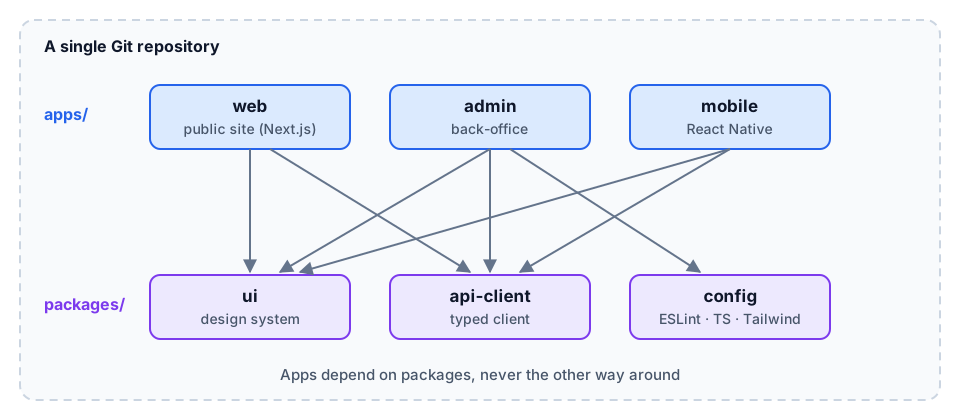
A structure that works
.
├── apps/
│   ├── web/          # public site (Next.js)
│   ├── admin/        # back office
│   └── mobile/       # React Native
├── packages/
│   ├── ui/           # design system: components + tokens
│   ├── config/       # shared ESLint, TypeScript, Tailwind
│   └── api-client/   # typed API client
├── pnpm-workspace.yaml
└── turbo.json
The rule: `apps` depend on `packages`, never the other way around, and packages never depend on apps. This keeps the dependency graph simple and avoids cycles.
The tooling
- Package manager workspaces (pnpm, npm or Yarn) link local packages together. With pnpm, the app declares
"@acme/ui": "workspace:*". - A task orchestrator: Turborepo or Nx run
build,lintandtestin the right order, in parallel, and cache the results. If theuipackage has not changed, its build is not rerun. - Lerna, historically the reference tool, is now maintained by the Nx team and remains relevant for publishing and versioning packages. Changesets is a popular lightweight alternative.
// turbo.json
{
  "tasks": {
    "build": {
      "dependsOn": ["^build"],
      "outputs": [".next/**", "dist/**"]
    },
    "lint": {},
    "test": { "dependsOn": ["^build"] }
  }
}
^build means "build dependencies first": the design system is compiled before the applications that use it.
Building the design system
- Start with tokens (colors, spacing, typography, radii) exposed as CSS variables. They make theming possible without touching components.
- Accessible components by default: build on proven primitives (Radix UI, React Aria) rather than rewriting focus and keyboard handling.
- Document with Storybook: every component shows its variants, which becomes the shared reference for designers and developers.
- Export cleanly: one entry point per component (
@acme/ui/button) helps tree-shaking.
Pitfalls we ran into
- Different React versions across apps: a single copy of React must be resolved, otherwise hooks break. Declare it as a
peerDependencyof the design system. - CI rebuilding everything on every commit: without remote caching and filtering on affected projects (
turbo run build --filter=...[origin/main]), build times explode. - A design system that becomes a junk drawer: a business component specific to one app does not belong there. It must stay generic.
What it gave us
The main gain was time-to-market: a new application started with authentication, theming and around twenty ready-made components. A fix in the design system reached every app in a single pull request, tested end to end.
Conclusion
A monorepo is not a silver bullet: it requires serious tooling and dependency discipline. But as soon as a team maintains several applications sharing a visual identity and business code, it is one of the most profitable investments you can make.