MCP: connecting your tools to an AI agent (a TypeScript server)
An AI agent is only useful if it can act on your environment: read a ticket, query a database, look up internal docs. For a long time every tool had its own integration, different for each assistant. The Model Context Protocol (MCP) fixes this with an open protocol: you write a server once, and every compatible client can use it.
A three-role architecture
- The host: the application the user works in (an IDE, a coding assistant, a chat app).
- The client: the part of the host that maintains a connection to one MCP server.
- The server: a small program that exposes capabilities: your APIs, your database, your files.
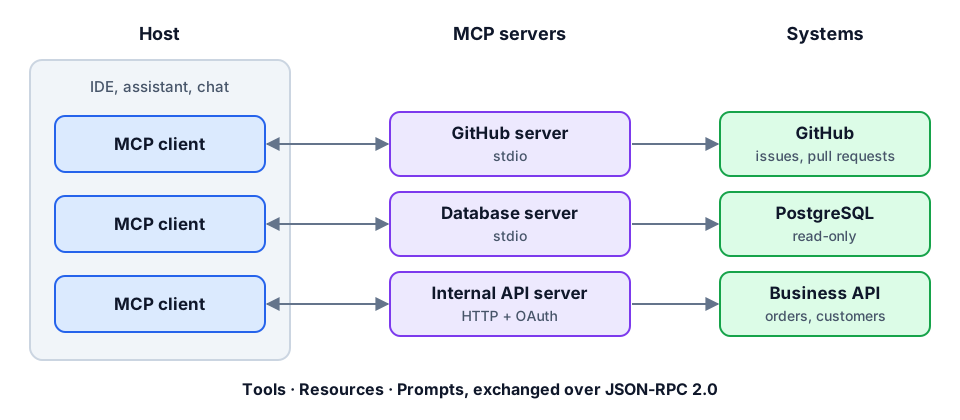
Messages use JSON-RPC 2.0 over two main transports: stdio (the server runs locally as a subprocess of the host) and HTTP (Streamable HTTP, for a remote server shared by a team).
What a server exposes
- Tools: actions the model can call, with parameters described by a JSON schema. The core of most servers.
- Resources: read-only data identified by a URI (a file, a record, a docs page).
- Prompts: reusable prompt templates offered to the user.
A minimal TypeScript server
With the official SDK and zod, exposing a tool takes a few lines. Here, a tool that returns the status of an order:
import { McpServer } from "@modelcontextprotocol/sdk/server/mcp.js";
import { StdioServerTransport } from "@modelcontextprotocol/sdk/server/stdio.js";
import { z } from "zod";
import { getOrder } from "./orders";

const server = new McpServer({ name: "orders", version: "1.0.0" });

server.registerTool(
  "get_order_status",
  {
    title: "Order status",
    description: "Returns the status and delivery date of an order from its id (e.g. ORD-1234).",
    inputSchema: { orderId: z.string().regex(/^ORD-\d+$/) },
  },
  async ({ orderId }) => {
    const order = await getOrder(orderId);
    if (!order) {
      return { isError: true, content: [{ type: "text", text: `Order ${orderId} not found` }] };
    }
    return { content: [{ type: "text", text: JSON.stringify({ status: order.status, eta: order.eta }) }] };
  },
);

await server.connect(new StdioServerTransport());
Three details that make the difference:
- The description is a prompt: it is what the model reads to decide when to call the tool. It should say what the tool does, when to use it and the expected format.
- The schema validates input: the model can send anything; zod rejects whatever breaks the contract before your code runs.
- Short, structured responses: returning only the useful fields saves context and reduces hallucinations.
Designing good tools
- Think in tasks, not endpoints: one
find_customer_orderstool beats three low-level REST calls the model has to chain. - Few tools, well named: beyond a few dozen, the model picks less accurately.
- Actionable errors: "order not found, expected format ORD-1234" lets the model correct itself.
- Separate reads from writes: tools that modify data should be clearly identified.
Security, seriously
An MCP server gives real access to your systems to a program that follows natural-language instructions. The basics:
- Least privilege: a read-only token if the tool only reads, a scope limited to what is strictly needed.
- Human confirmation for irreversible or outbound actions (deletion, payment, sending an email).
- Indirect prompt injection: content returned by a tool (a ticket, a web page, an email) may contain malicious instructions. It must be treated as data, never as a command.
- Third-party servers: installing an MCP server means installing a dependency that runs with your permissions. Same care as an npm package: source, maintainer, pinned version.
- Authentication for HTTP servers: the protocol builds on OAuth; never expose a remote server without access control.
Conclusion
MCP does for AI agents what REST APIs did for web applications: a common interface. For a full-stack developer it is a very worthwhile skill: exposing a product's capabilities to agents cleanly, with the same rigor as a public API, schemas, clear errors, minimal permissions.