Adding an LLM to a Next.js app: streaming, tool calling, costs and security
A chatbot or an assistant built into a product is now a common request. The demo is easy: one API call and a text field. The production version raises other questions: where does the API key live, how do you display the answer as it is generated, how do you give access to product data, how much does it cost, and what happens when a user tries to hijack the model.
The architecture: everything goes through the server
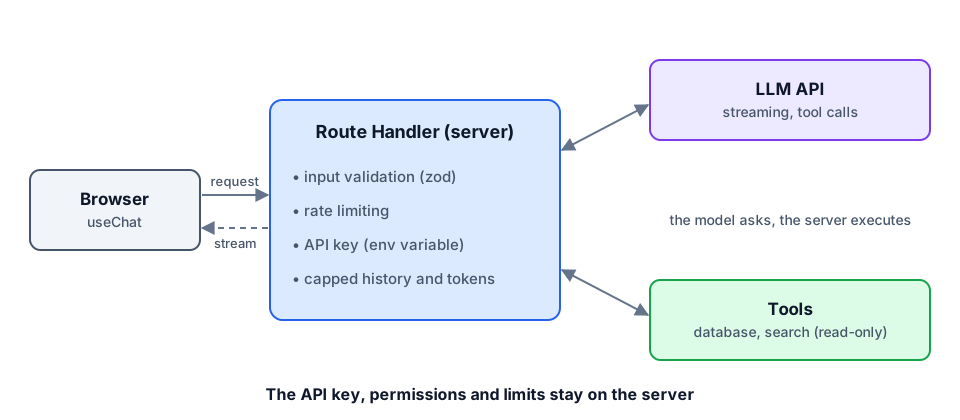
The browser never talks directly to the model provider. A Next.js Route Handler sits in between: it keeps the API key, validates input, enforces limits and runs the tools.
Streaming and tool calling
An LLM answer can take several seconds. Streaming shows the first words almost immediately, which completely changes how it feels. Tool calling lets the model ask for one of your functions to be executed, then use the result in its answer. Example with the AI SDK:
// app/api/chat/route.ts
import { streamText, tool, convertToModelMessages, stepCountIs } from "ai";
import { z } from "zod";
import { model, SYSTEM_PROMPT } from "@/lib/ai";
import { searchProjects } from "@/lib/projects";
import { rateLimit } from "@/lib/rate-limit";

export async function POST(req: Request) {
  const ip = req.headers.get("x-forwarded-for") ?? "anonymous";
  if (!(await rateLimit(ip))) return new Response("Too many requests", { status: 429 });

  const { messages } = await req.json();

  const result = streamText({
    model,
    system: SYSTEM_PROMPT,
    messages: convertToModelMessages(messages.slice(-20)),
    maxOutputTokens: 800,
    stopWhen: stepCountIs(3),
    tools: {
      searchProjects: tool({
        description: "Searches portfolio projects by technology or domain.",
        inputSchema: z.object({ query: z.string().max(100) }),
        execute: async ({ query }) => searchProjects(query),
      }),
    },
  });

  return result.toUIMessageStreamResponse();
}- `messages.slice(-20)`: cap the history you send, otherwise every exchange costs more than the previous one.
- `stopWhen`: limit the number of tool ↔ model round trips to avoid loops.
- `maxOutputTokens`: a single answer must not be able to blow the budget.
Structured outputs: never parse free text
As soon as the answer feeds code (a prefilled form, a classification, tags), ask for a structured output matching a schema, and validate it with zod. "Almost valid" JSON extracted with a regex will always end up breaking in production.
Keeping costs under control
- Pick the right model per task: a small fast model to classify or summarize, a large model only when the reasoning justifies it.
- Prompt caching: the system prompt and reference documents are identical from one request to the next; most providers let you cache them to cut cost and latency significantly.
- Rate-limit per IP or per user, and set a monthly budget with alerts at the provider.
- Measure: input and output tokens per request, logged with the conversation id.
Security: prompt injection
Anything the user writes, and anything the tools return, can contain instructions like "ignore your previous instructions". There is no perfect defense, so you limit what the model can do rather than what it can read:
- Read-only tools by default, with validated parameters and a scope limited to public data or the signed-in user's data.
- Permissions come from the session, not the prompt: the user id is injected server-side, never asked of the model.
- No secrets in the system prompt: assume it will eventually be displayed.
- Escape the output: the model's answer is rendered as text or sanitized Markdown, never as raw HTML.
Evaluate before you ship
Switching models or changing one line of the system prompt can degrade answers that used to work. A small set of evals (thirty or so real questions with expected criteria) run in CI is the equivalent of regression tests for an AI product.
Conclusion
Adding an LLM is mostly classic full-stack work: a server-side API, validation, rate limiting, caching, observability and tests. The model is just one more dependency, powerful, non-deterministic and billed per token, and it needs to be framed as such.