Core Web Vitals: diagnosing and fixing a poor INP
Since March 2024, INP (Interaction to Next Paint) has replaced FID among the Core Web Vitals, the three metrics Google uses to assess user experience. It is also the one React applications struggle with most. Unlike FID, which only measured the delay of the first interaction, INP observes every interaction during the visit and reports one of the slowest.
The three Core Web Vitals in brief
- LCP (Largest Contentful Paint): time to render the largest visible element. Good: 2.5 s or less.
- CLS (Cumulative Layout Shift): visual stability, elements that "jump". Good: 0.1 or less.
- INP (Interaction to Next Paint): delay between an interaction (click, key press, tap) and the next visual update. Good: 200 ms or less; poor: over 500 ms.
These thresholds are assessed at the 75th percentile of real visits: it is not enough for the page to be fast on your MacBook, it has to be fast on your users' mid-range phones.
Anatomy of an interaction
The INP of an interaction breaks down into three phases. Knowing which one dominates tells you directly what to fix.
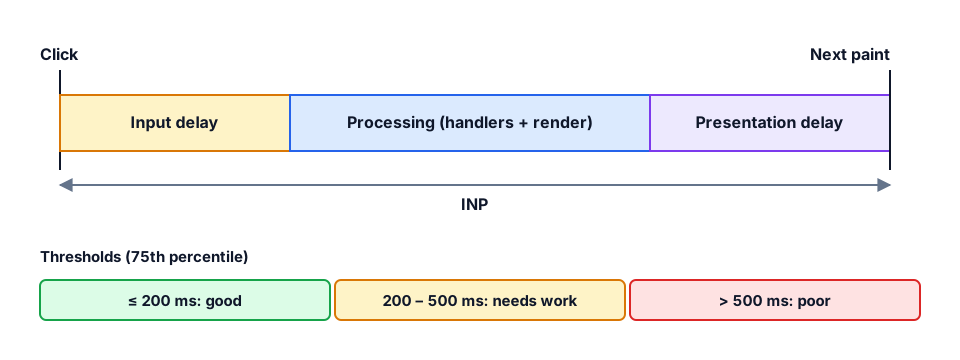
- Input delay: the main thread is busy with something else (a third-party script, hydration, a timer) when the user clicks.
- Processing duration: the time your event handlers take to run and, in React, the re-render they trigger.
- Presentation delay: the browser recalculates styles and layout, then paints. A huge DOM or expensive animations stretch it.
Step 1: measure in the field
Lab tools (Lighthouse) do not simulate real interactions. You need real-user data: the Core Web Vitals report in Google Search Console and, above all, the web-vitals library in its attribution build, which reports the element involved and the split between the three phases.
import { onINP } from "web-vitals/attribution";

onINP(({ value, rating, attribution }) => {
  sendToAnalytics({
    metric: "INP",
    value,
    rating,
    target: attribution.interactionTarget,
    inputDelay: attribution.inputDelay,
    processing: attribution.processingDuration,
    presentation: attribution.presentationDelay,
  });
});
Step 2: reproduce locally
In Chrome DevTools, the Performance panel shows live INP as you interact. Enable CPU throttling (4x or 6x) to get closer to a real phone, record the culprit interaction and look for long tasks (over 50 ms) flagged in red.
Step 3: fix it
Yield to the browser
A long task blocks everything. Splitting it lets the browser paint visual feedback between chunks of work. Update the UI first, then do the heavy work.
async function onFilterChange(value: string) {
  setInputValue(value);          // immediate visual feedback
  await yieldToMain();           // the browser can paint
  runExpensiveFiltering(value);  // heavy work afterwards
}

function yieldToMain() {
  // scheduler.yield() when available, setTimeout otherwise
  if ("scheduler" in globalThis && "yield" in (globalThis as any).scheduler) {
    return (globalThis as any).scheduler.yield();
  }
  return new Promise((resolve) => setTimeout(resolve, 0));
}
In React: transitions
startTransition (or useTransition) marks an update as non-urgent. React keeps the input responsive and interrupts the expensive render if the user keeps typing. useDeferredValue gives the same benefit for a derived value.
const [query, setQuery] = useState("");
const deferredQuery = useDeferredValue(query);

return (
  <>
    <input value={query} onChange={(e) => setQuery(e.target.value)} />
    <ResultsList query={deferredQuery} />  {/* non-blocking render */}
  </>
);
Do less work
- Avoid unnecessary re-renders: state placed too high in the tree, contexts that change on every render. The React Compiler and
memohelp, as long as you measure. - Virtualize long lists (TanStack Virtual): render 30 rows instead of 3,000.
- Slim down the DOM: every extra node costs at layout time.
- Audit third-party scripts: a single analytics or chat widget can monopolize the main thread. Load them after interaction or in a web worker.
Conclusion
A poor INP is almost never caused by "React being slow", but by one specific interaction doing too much work at the wrong time. Measure in the field, identify the dominant phase, then prioritize visual feedback and defer the heavy lifting. Fixing a handful of interactions is often enough to turn a whole site green.