Coding with an AI assistant: method and guardrails
In just a few years, coding assistants went from enhanced autocomplete to agents that can read a project, edit several files and run the tests. Used without method, they quickly produce code that "looks right" but that nobody understands. Used with method, they save a considerable amount of time.
Here is the way of working I have adopted day to day.
The principle: AI proposes, the developer decides
The assistant is a very fast collaborator that has read a lot but knows neither your product, nor your constraints, nor the history of your decisions. Responsibility for merged code remains entirely yours. Everything else follows from that.
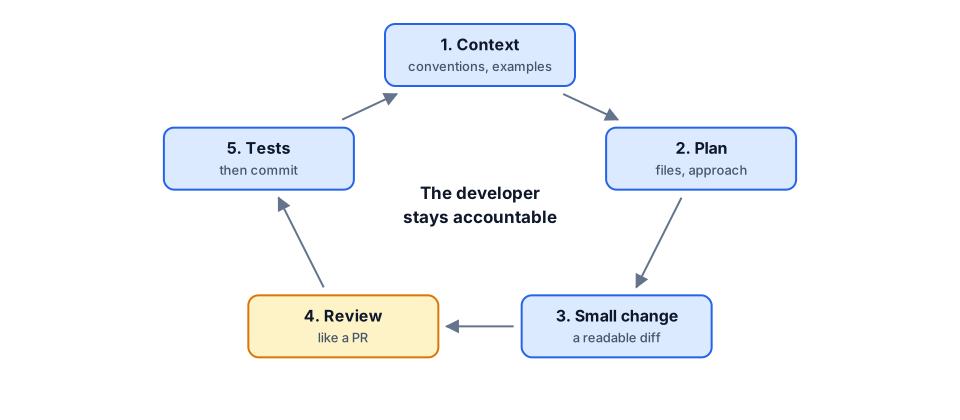
1. Provide context
The quality of the answer depends directly on the quality of the context. A good starting point:
- An instructions file in the repository (conventions, build and test commands, architecture, things not to do). Most tools read it automatically.
- Existing examples: "do it like
UserService" beats a long description. - The expected outcome and constraints: library versions, compatibility, performance.
2. Plan before generating
For any task longer than a few lines, I first ask for a plan: which files will change, which approach, which alternatives. Reviewing a ten-line plan takes a minute; reviewing 500 lines of code going in the wrong direction takes thirty.
3. Move in small steps
- One coherent change at a time, small enough to review in full.
- One commit per validated step: if the next step goes the wrong way, you roll back without losing anything.
- No "rewrite the whole module": large one-shot changes are the hardest to verify.
4. Review it like a pull request
Generated code deserves the same scrutiny as a colleague's, if not more. What I check systematically:
- Invented APIs: a method or option that does not exist in the version you use.
- Error handling: edge cases are often handled optimistically.
- Security: SQL built by string concatenation, hard-coded secrets, missing input validation.
- Duplication: the assistant happily rewrites a function that already exists elsewhere in the project.
- Tests passing for the wrong reasons: a test changed to match the code, rather than the other way around.
5. Tests as a safety net
Tests turn the assistant from a generator of plausible code into a generator of verified code. An effective approach: write (or have written, then review) the tests first, then ask for the implementation until they pass.
Prompt: "Here is the failing test (formatPrice.test.ts).
Implement formatPrice in src/lib/format.ts to make it pass,
without changing the test. Use Intl.NumberFormat."
Where AI shines… and where it is risky
- Excellent: repetitive code, tests, scripts, mechanical migrations, explaining unfamiliar code, first drafts of documentation.
- Useful with care: refactorings, new features in well-structured code.
- Risky: security, cryptography, critical business logic, architecture decisions. AI can help you think, not decide for you.
What about confidentiality?
Before using an assistant on a client project, check the company policy: which tool is approved, whether data is used for training, where it is hosted. Never paste secrets or personal data into a conversation.
Conclusion
AI assistants do not replace a developer's judgment; they make it more important than ever. Clear context, plan first, small iterations, serious review and tests: with that discipline, AI becomes a real productivity multiplier rather than a source of technical debt.